In today’s digital world, video content has become the most engaging form of media across all social platforms. Pinterest, known primarily for its stunning images and creative ideas, has evolved into a powerhouse of video content. From quick recipe demonstrations and home improvement tutorials to fashion lookbooks and travel guides, Pinterest videos offer endless inspiration and entertainment. However, one challenge users face is the inability to save these videos directly from the platform for offline viewing.
This is where a reliable Pinterest video downloader becomes essential. Save Pin offers a lightning-fast solution that allows you to download any Pinterest video in just seconds. Whether you’re planning a weekend project, preparing meals for the week, or simply want to save motivational content, having these videos available offline gives you the freedom to access inspiration anytime, anywhere.
The Growing Popularity of Pinterest Videos
Pinterest has transformed significantly over the years. What started as a platform for sharing static images has become a dynamic space where video content thrives. According to recent trends, video pins receive significantly more engagement than regular image pins, making them a preferred choice for content creators and brands alike.
Why Videos Dominate Pinterest
Videos tell stories in ways that static images cannot. They provide step-by-step demonstrations, showcase transformations, and deliver information in digestible, entertaining formats. A cooking video can show you exactly how to fold dough, a makeup tutorial can demonstrate brush techniques in real-time, and a DIY project video can guide you through each construction phase.
This visual learning experience is why millions of users scroll through Pinterest daily, discovering videos that educate, inspire, and entertain. The problem is that these videos require an internet connection to watch, and Pinterest’s interface doesn’t offer a download button. This limitation creates frustration for users who want to reference content later or watch it in environments without reliable internet access.
The Need for Downloading Solutions
Imagine finding the perfect workout routine video during your lunch break, but you want to use it at the gym where you have poor internet reception. Or discovering a detailed woodworking tutorial that you want to reference while working in your garage without carrying your phone around constantly. These real-world scenarios highlight why downloading Pinterest videos has become such a common need.
Professional content creators, educators, designers, and everyday users all benefit from having offline access to Pinterest videos. Whether it’s for research, inspiration, education, or entertainment, the ability to save videos transforms how we consume and utilize digital content.
Understanding Pinterest Video Downloader Tools
A Pinterest video downloader is a specialized tool designed to extract and save videos from Pinterest to your device. These tools work by processing the video URL and providing downloadable files that you can store locally on your smartphone, tablet, or computer.
How Video Downloaders Work
The technology behind video downloaders is straightforward yet sophisticated. When you watch a video on Pinterest, it’s streaming from Pinterest’s servers to your device. A video downloader acts as an intermediary, accessing the video file through its URL and converting it into a downloadable format that you can save permanently.
Save Pin uses advanced algorithms to quickly process video links and generate download options in various quality settings. The entire process happens in seconds, making it one of the fastest solutions available for downloading Pinterest content.
Different Types of Downloaders
Video downloading tools come in various forms. Some require software installation on your computer, while others function as browser extensions. Many modern downloaders, including Save Pin, are web-based platforms that work directly in your browser without requiring any downloads or installations.
Web-based downloaders offer several advantages. They work on any device with a browser, don’t take up storage space on your device, and don’t require updates or maintenance. This makes them the most convenient option for casual users who occasionally want to save videos without committing to installed software.
Why Save Pin is Your Best Choice
Among the numerous Pinterest video downloaders available online, Save Pin stands out for its speed, simplicity, and reliability. Several key features make this platform the preferred choice for users worldwide.
Lightning-Fast Processing
Time is valuable, and nobody wants to wait minutes for a video to process. Save Pin lives up to its promise of saving videos in seconds. From the moment you paste a video link to when the download begins, the entire process typically takes less than ten seconds. This efficiency is possible due to optimized servers and streamlined processing algorithms.
The platform handles multiple requests simultaneously without slowdown, ensuring that even during peak usage times, your downloads remain fast. This speed advantage becomes particularly noticeable when you need to download multiple videos for a project or collection.
Zero Cost, Zero Limitations
Many video downloading services operate on freemium models, offering limited downloads or reduced quality unless you upgrade to a paid plan. Save Pin takes a different approach by offering completely free, unlimited downloads with no restrictions.
You never need to worry about hitting download limits, paying subscription fees, or compromising on video quality. Every feature is available to every user at no cost, making high-quality video downloading accessible to everyone.
No Registration Hassles
Privacy concerns and registration fatigue are real issues in today’s digital landscape. Save Pin respects your time and privacy by eliminating the need for account creation. You don’t need to provide your email address, create a password, or fill out any forms.
This no-registration approach means you can start downloading immediately without barriers. It also ensures that your downloading activity remains private, as the platform doesn’t track user accounts or build profiles based on download history.
Universal Device Compatibility
Whether you’re using the latest iPhone, an Android tablet, a Windows laptop, or a Mac desktop, Save Pin works flawlessly across all platforms. The web-based interface is responsive and adapts to different screen sizes, providing an optimal experience regardless of your device.
This cross-platform compatibility is especially valuable for users who switch between devices throughout the day. You might discover a video on your phone during your morning commute and download it on your laptop at work, or vice versa. The consistent experience across devices makes this seamless.
Clean, Intuitive Interface
Complicated interfaces with confusing buttons and excessive advertisements can turn video downloading into a frustrating experience. Save Pin features a clean, minimalist design that focuses on functionality. The interface presents exactly what you need – a text box for your link and a download button – without unnecessary clutter.
This simplicity doesn’t mean lack of features; rather, it represents thoughtful design that prioritizes user experience. Even first-time users can navigate the platform confidently without tutorials or guides.
Step-by-Step Guide to Downloading Pinterest Videos
Downloading videos with Save Pin is remarkably simple, but let’s walk through the process in detail to ensure you get perfect results every time.
Step One: Find Your Video
Begin by browsing Pinterest as you normally would. Use the search function to find videos related to your interests, or scroll through your home feed until you discover content you want to save. When you find a video worth downloading, you’re ready for the next step.
Step Two: Copy the Video Link
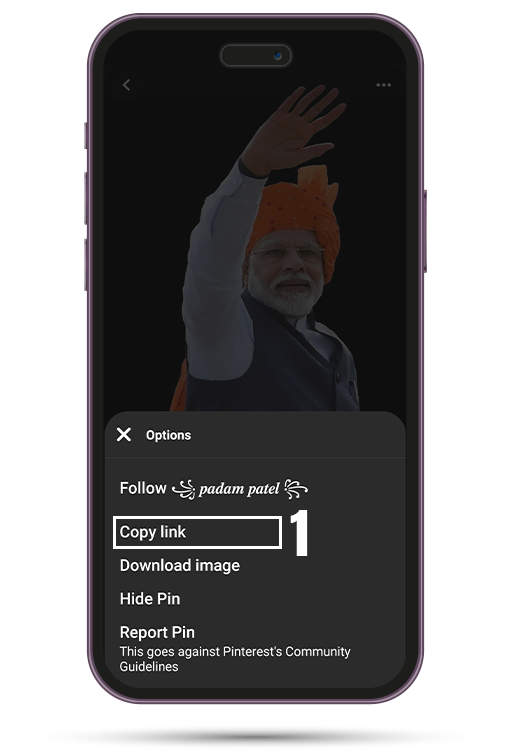
On a mobile device, tap the video to open it, then tap the three dots icon (usually located in the corner of the screen). A menu will appear with several options. Select “Copy Link” to copy the video URL to your device’s clipboard.
On a desktop computer, the process is slightly different. Right-click directly on the video player, and you’ll see a context menu. Look for an option that says “Copy Link Address” or similar wording. Click this option to copy the video URL.
Step Three: Access the Platform
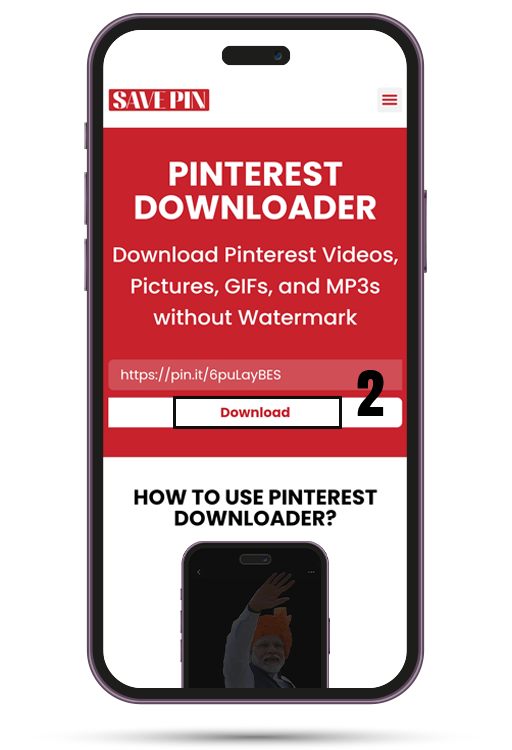
Open your web browser and navigate to the Save Pin platform. The homepage presents a simple, welcoming interface with clear instructions. You’ll immediately see the main feature – a text input box designed for pasting video links.
Step Four: Paste and Process
Click inside the text box and paste the Pinterest video URL you copied earlier. You can use the keyboard shortcut (Ctrl+V on Windows, Command+V on Mac) or right-click and select paste. Once the link appears in the box, click the processing button.
The platform will immediately begin analyzing the video link. Within seconds, you’ll see confirmation that the video has been processed successfully. The system extracts all available quality options from the source video.
Step Five: Choose Quality and Download
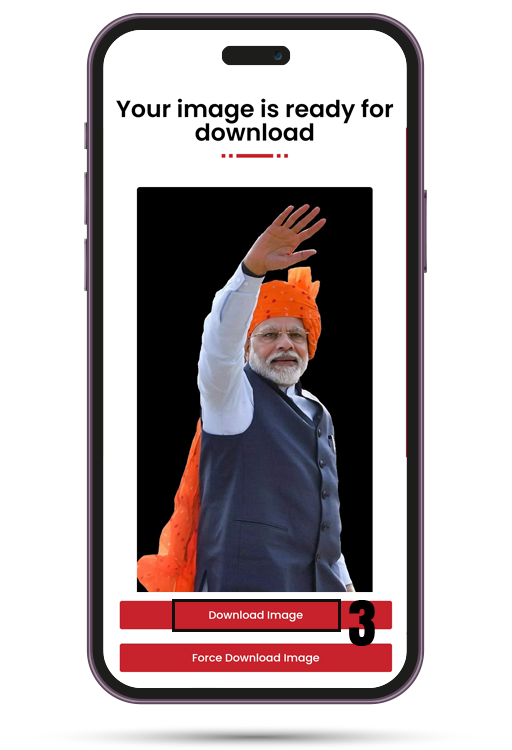
After processing, you’ll see download options displaying different quality levels. HD options provide the best visual experience, while standard quality options result in smaller file sizes. Select the quality that best matches your needs.
Click the download button next to your chosen quality. Your browser will prompt you to save the file, and the download will begin immediately. Depending on your internet speed and the video size, the download should complete within seconds to a few minutes.
Step Six: Access Your Downloaded Video
Once downloaded, the video is saved to your device’s default download location. On smartphones, this is usually a Downloads folder accessible through your file manager. On computers, videos typically save to the Downloads folder unless you’ve specified a different location.
You can now watch the video using your device’s default video player, move it to a specific folder for organization, or share it with others through messaging apps or cloud storage.
Maximizing Your Download Experience
While the basic downloading process is straightforward, several tips and best practices can enhance your experience and help you build an impressive offline video collection.
Quality Selection Strategy
Choosing the right quality setting depends on several factors. If you plan to watch the video on a large screen like a tablet or computer monitor, HD quality is recommended for the best visual clarity. For videos you’ll only watch on a smartphone, standard quality may be sufficient while saving storage space.
Consider your device’s storage capacity when selecting quality. HD videos consume more space, so if you’re running low on storage, you might need to choose lower quality options or regularly transfer videos to external storage.
Organizing Your Video Library
As your collection of downloaded Pinterest videos grows, organization becomes important. Create dedicated folders for different categories – cooking, fitness, home improvement, fashion, travel, and so on. This categorization makes it easy to find specific videos later without scrolling through hundreds of files.
Consider adding dates to folder names or individual video files if you want to track when you downloaded them. Some users prefer organizing by project (for example, “Kitchen Renovation Ideas” or “Summer Wardrobe Inspiration”) rather than broad categories.
Internet Connection Considerations
While the downloading process itself is fast, your internet connection speed affects how quickly the video file transfers to your device. For the best experience, use a stable Wi-Fi connection rather than mobile data, especially when downloading HD videos.
If you’re downloading multiple videos, a strong internet connection ensures smooth, uninterrupted downloads. However, even on moderate connections, individual videos download quickly due to the platform’s optimized delivery system.
Regular Browser Maintenance
Occasionally clearing your browser’s cache and cookies can prevent potential downloading issues. Browsers store temporary data that sometimes conflicts with web applications. A monthly clear-out keeps your browser running smoothly and ensures compatibility with downloading platforms.
Additionally, keeping your browser updated to the latest version provides better security and performance. Most modern browsers update automatically, but it’s worth checking occasionally to ensure you’re running the current version.
Legal and Ethical Considerations
Understanding the legal and ethical aspects of downloading Pinterest videos helps you use these tools responsibly and respectfully.
Personal Use Guidelines
Downloading Pinterest videos for personal, private use is generally acceptable. This includes saving videos to watch offline, using them as references for your own creative projects, or keeping them in a personal inspiration library. Personal use means the content stays with you and isn’t redistributed or used commercially.
Respecting Content Creators
Every video on Pinterest represents someone’s creative effort, time, and expertise. When you download and enjoy their content, consider supporting them by engaging with their original pins, following their accounts, or visiting their websites if they’re creators or businesses.
If a video particularly inspires you or helps you accomplish something, leaving a comment or sharing it (through Pinterest’s sharing features) helps the creator gain visibility and recognition for their work.
Copyright Awareness
Copyright laws protect most online content, including Pinterest videos. While downloading for personal viewing generally falls under fair use, redistributing, republishing, or incorporating downloaded videos into your own commercial content without permission violates copyright laws.
If you want to use a downloaded video in a presentation, publication, or any public context, reach out to the original creator for permission. Most creators appreciate being asked and may grant permission with proper attribution.
Platform Terms of Service
Familiarize yourself with Pinterest’s terms of service to understand the platform’s stance on content usage. While video downloaders like Save Pin provide the technical capability to save videos, users are responsible for ensuring their usage complies with applicable terms and laws.
Troubleshooting Common Issues
Even with a reliable platform like Save Pin, occasional issues may arise. Here’s how to address the most common problems.
Link Not Working
If the platform indicates that your link is invalid or cannot be processed, first verify that you’ve copied the complete URL. Sometimes partial links are copied accidentally, especially on mobile devices where selection can be imprecise.
Try copying the link again, ensuring you’ve selected the entire URL from beginning to end. If the problem persists, the video might have privacy restrictions or the original pin may have been deleted from Pinterest.
Download Button Not Responding
If clicking the download button produces no result, check that your browser isn’t blocking pop-ups or downloads. Some browsers have strict security settings that prevent automatic downloads. Check your browser’s settings and add the platform to your allowed sites list.
Browser extensions, particularly ad blockers or privacy tools, can sometimes interfere with download functionality. Try temporarily disabling extensions to see if this resolves the issue.
Video Quality Lower Than Expected
Download quality is limited by the original video quality. If a video was uploaded to Pinterest in standard definition, even selecting HD download options won’t improve it beyond the source quality. The platform downloads videos in their original quality, preserving what the creator uploaded.
File Format Compatibility
Most downloaded videos use widely compatible formats like MP4 that play on virtually any device and media player. If a video won’t play on your device, ensure your media player is updated. Free players like VLC Media Player support nearly all video formats and can resolve playback issues.
The Future of Video Content and Downloading
As digital content consumption continues to evolve, video downloading tools will remain essential for users who value flexibility and offline access.
Emerging Video Trends
Pinterest continues to invest heavily in video content, introducing features like Idea Pins (multi-page video stories) and live shopping videos. These innovations make the platform even more video-centric, increasing the value of tools that provide offline access.
Short-form vertical videos have gained tremendous popularity across all platforms, and Pinterest has adapted by promoting this format. These bite-sized videos are perfect for quick inspiration and easy to download and watch on mobile devices.
Technology Improvements
Video compression technology continues to advance, allowing higher quality videos in smaller file sizes. This means future downloads will likely offer better quality without consuming excessive storage space. Downloading tools evolve alongside these technological improvements to maintain compatibility and performance.
User Expectations
Modern internet users expect on-demand access to content on their terms. The desire for offline viewing, flexible playback, and personal content libraries drives the continued development and refinement of video downloading platforms. Tools that prioritize speed, quality, and user experience will continue to thrive.
Building Your Inspiration Archive
Downloaded Pinterest videos can serve as valuable resources across many areas of your life.
Educational Resources
Many Pinterest videos offer educational content on topics ranging from academic subjects to practical life skills. Teachers can curate videos for classroom use, students can save study materials, and lifelong learners can build libraries of tutorials and explanatory content.
Creative Inspiration
Artists, designers, crafters, and creative professionals find endless inspiration on Pinterest. Downloading videos creates a personal mood board that’s always accessible. When working on a project, you can reference multiple videos without switching apps or requiring internet access.
Skill Development
Whether you’re learning to cook, improving your fitness, developing professional skills, or exploring new hobbies, Pinterest videos provide valuable instruction. Downloaded tutorial videos allow you to follow along at your own pace, pause whenever needed, and repeat sections until you master techniques.
Project Planning
Home renovation, event planning, garden design, and numerous other projects benefit from visual references. Downloading related videos creates a project folder where all your inspiration and instruction live in one place, easily accessible when you’re actively working.
The entire process takes just seconds. Once you paste the video link and click the process button, the platform analyzes the video and provides download options within 5-10 seconds. The actual download time depends on your internet speed and the video file size, but most videos download in under a minute. This makes Save Pin one of the fastest Pinterest video downloaders available.
Yes, Save Pin works perfectly on both iPhone and Android devices, as well as tablets and computers. Since it’s a web-based platform, you simply need a browser to access it. The interface is fully responsive and adapts to mobile screens, providing the same fast, reliable downloading experience regardless of your device or operating system.
No account creation is required. Save Pin prioritizes your privacy and convenience by eliminating the registration process entirely. You can start downloading videos immediately without providing any personal information, email address, or creating a password. This makes the service completely anonymous and hassle-free.
Save Pin offers all quality options available from the original Pinterest video. This typically includes HD (high definition) and standard quality options. The platform preserves the original video quality, so if a video was uploaded in 1080p HD, you can download it in that quality. You can choose the quality that best balances file size and visual clarity for your needs.
There are absolutely no limits on the number of videos you can download. Save Pin offers unlimited free downloads without any daily, weekly, or monthly restrictions. You can download as many Pinterest videos as you want, whenever you want, without worrying about hitting caps or needing to upgrade to a paid plan.
Conclusion
Pinterest’s vast collection of video content offers unlimited inspiration, education, and entertainment. However, the platform’s lack of a native download feature creates a gap between discovering content and having reliable access to it. Save Pin bridges this gap perfectly, offering a fast, free, and user-friendly solution for downloading Pinterest videos in seconds.
The platform’s commitment to speed, quality, and accessibility makes it the ideal choice for anyone who wants to build an offline library of Pinterest videos. Whether you’re a professional seeking reference materials, a hobbyist collecting tutorials, or someone who simply enjoys having favorite content available anytime, this tool provides exactly what you need.
Start building your personal video library today. Discover the freedom of offline access, the convenience of having inspiration at your fingertips, and the satisfaction of curating content that matters to you. With unlimited free downloads, no registration requirements, and lightning-fast processing, there’s never been a better time to start saving your favorite Pinterest videos.